What this article covers
The SEC Marketing Rule changed the game for financial advisors. Client testimonials are now a legitimate and powerful marketing tool, and the advisors using them are converting more referred prospects into clients than those who aren’t. But “using testimonials” and “using testimonials compliantly” are meaningfully different things, and the gap between them is where most advisors run into trouble. This guide covers exactly how to display client reviews on your financial advisor website, including what the SEC requires when you show all your reviews versus just a curated few, two proven implementation approaches for different firm sizes, step-by-step instructions for adding Wealthtender widgets to your site, and a tool that writes the handoff email to your website developer for you.
In this guide, learn how to add widgets from Wealthtender to display testimonials on advisor websites compliantly. Whether you’re creating a dedicated testimonials page, adding reviews to your homepage and bio pages, or simply trying to explain what you need to your website developer, you’ll find step-by-step instructions, links to live examples, an interactive tour of your embed codes, and answers to frequently asked questions to help you leverage the power of social proof while staying within regulatory guidelines.
Two tools inside this guide
Already know what you need? Skip straight to it.
Jump to a Section:
- Why 83% of Referred Prospects Look for Reviews Before Calling and What That Means for Your Website
- SEC Disclosure Requirements for Financial Advisor Testimonials: What You Need to Know
- Two Popular Ways to Promote Testimonials on Advisor Websites
- Approach #1: The Comprehensive Approach for Multi-Advisor Firms
- Approach #2: Homepage Spotlight for Solo Advisors and Smaller Firms
- How to Access Your Wealthtender Embed Codes
- Email Template: What to Send Your Website Developer About Adding Client Testimonials
- Your Next Three Steps: From Embed Code to Live Testimonials
- FAQs: Review Widgets, Troubleshooting & More
- Building a Testimonial Marketing Strategy That Compounds Over Time
Key Takeaways
Displaying testimonials compliantly takes more than copying and pasting a review.
The SEC Marketing Rule sets different disclosure requirements depending on how many reviews you display and where. When a widget shows all of your reviews, the built-in disclosures on a compliant platform like Wealthtender generally satisfy the requirements. When you feature just one or a select few, in a homepage carousel or a social media post, you must also disclose that the views shown are not representative and provide easy access to your complete review history. Getting this wrong is one of the most common compliance missteps in advisor testimonial marketing.
83% of consumers say online reviews are the first thing they look for after being referred to a financial advisor.
The referred prospect who Googles your name before calling is making a hiring decision, not browsing. An advisor website with no visible testimonials, or with testimonials displayed without proper disclosures, loses that prospect to a competitor who made it easier to feel confident. Wealthtender embed widgets address both problems at once: they display your complete review history automatically and include the required regulatory disclosures by design.
A testimonial carousel and a Wealthtender widget are two different things, and most firms end up using both.
A carousel is something your website developer builds using your website platform’s own component. It shows a curated few reviews, which is exactly why it needs disclosure text directly beneath it. A Wealthtender widget is a snippet of code your developer pastes in, and it shows every review with the required disclosures already attached to each one. Confusing the two is the single most common reason an implementation stalls.
The step that stalls most implementations is the handoff to your website team, not the compliance.
Most advisors know what they want on their site. Far fewer know how to explain it to a web developer in terms that come back correct the first time. This guide includes a tool that writes that email for you, with your firm name, your review link, and the required disclosure language already filled in.
Why 83% of Referred Prospects Look for Reviews Before Calling and What That Means for Your Website
Testimonial marketing is quickly becoming an integral component of effective growth strategies employed by advisors and wealth management firms for three key reasons:
Building Trust with Prospects
When potential clients research financial advisors online, testimonials provide the social proof they need to feel confident about scheduling an introductory call. Reviews published on third-party platforms like Wealthtender and displayed on advisor websites demonstrate the real-world experiences of clients that offer prospects a glimpse of what to expect.
An August 2025 Wealthtender consumer study reinforced the reasons why financial advisors interested in getting found and hired should incorporate online reviews and testimonials in their marketing plans. The report showed that almost all Americans preparing to hire financial advisors will research at least two advisors online before making a hiring decision, and 83% of consumers ranked online reviews as the first thing they will look for after being referred to an advisor.
With fewer than 10% of advisors currently using testimonials in their marketing activities, it’s no surprise why advisors with online reviews and testimonials published on their websites are most likely to get the first call.
Wealthtender consumer researchWhat people do first after being referred to a financial advisor. August 2025 study of Americans preparing to hire an advisor.
Search Engine Optimization (SEO)
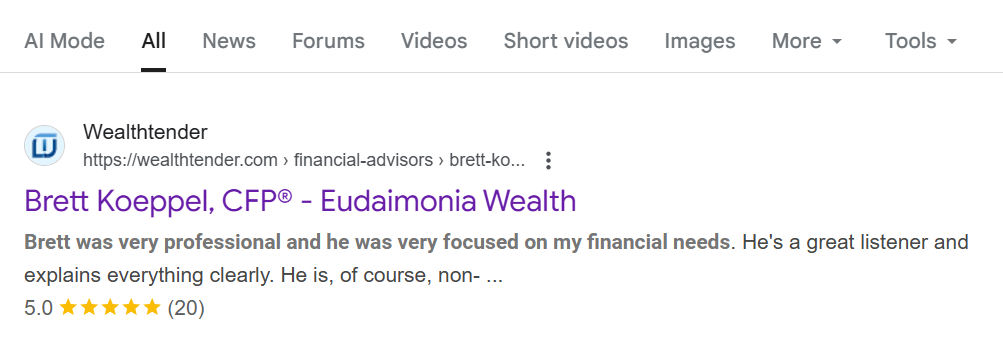
Traditional search engines like Google and Bing reward advisors who publish authentic client testimonials on their websites and who have positive reviews on reputable third-party platforms. Online review platforms like Wealthtender use SEO best practices like ‘review schema’ when coding advisor profile pages to ensure search engines recognize the reviews and ingest them properly to improve their effectiveness. With proper coding, these testimonials send positive trust signals to search engine algorithms, helping advisors rank higher in search results. And consumers are drawn to search results that display gold stars.
AI Platform Discovery
As more consumers turn to AI tools and answer engines like ChatGPT, Perplexity, and Google AI Overviews to find and research financial advisors, these platforms actively scan for credible online reviews and testimonials. Advisors with a robust collection of reviews and testimonials online are more likely to be recommended by AI tools in generated answers to consumer queries. As FMG Chief Evangelist Samantha Russell often suggests, online reviews represent one of the most important elements of an effective Answer Engine Optimization (AEO) strategy, and Wealthtender offers one of the most impactful AI-optimization tools for advisors and wealth management firms.
The combination of these three factors means that advisors who embrace testimonial marketing today position themselves to capture a disproportionate share of new client opportunities in the years ahead. By combining the power of online reviews published on Wealthtender with the testimonial marketing tools provided by Wealthtender to display reviews compliantly on advisor websites, in social media posts, and other marketing materials, financial advisors and wealth management firms can stand apart from more than 90% of all advisors and expect to convert more prospects into clients.
Wealthtender consumer researchThe highlighted rows show that consumers trust reviews on an independent third-party site more than testimonials published on an advisor’s own website.
Go deeper
For a more robust discussion of the SEC Marketing Rule and how to get started with testimonial marketing compliantly, review the SEC Marketing Rule Education Series or download your Testimonial Marketing Playbook from Wealthtender.
SEC Disclosure Requirements for Financial Advisor Testimonials: What You Need to Know
While the SEC Marketing Rule now permits financial advisors to use client testimonials in advertisements, the regulations come with specific requirements that must be followed carefully. This is especially important when choosing how you will display reviews on your website. Before inviting clients to write reviews or publishing testimonials online, be sure to speak with your compliance officer for regulatory guidance and to ensure adherence to firm policies and procedures.
The Three Disclosures the SEC Requires on Every Promoted Testimonial
The SEC makes it clear that every promoted testimonial should ‘clearly and prominently’ disclose details intended to provide consumers with important information to judge the merits of each review, including:
The SEC expects these three clear and prominent disclosures to always be visible alongside the review. In other words, clear and prominent disclosures effectively become a part of the review itself and cannot be hidden or accessible only via a link.
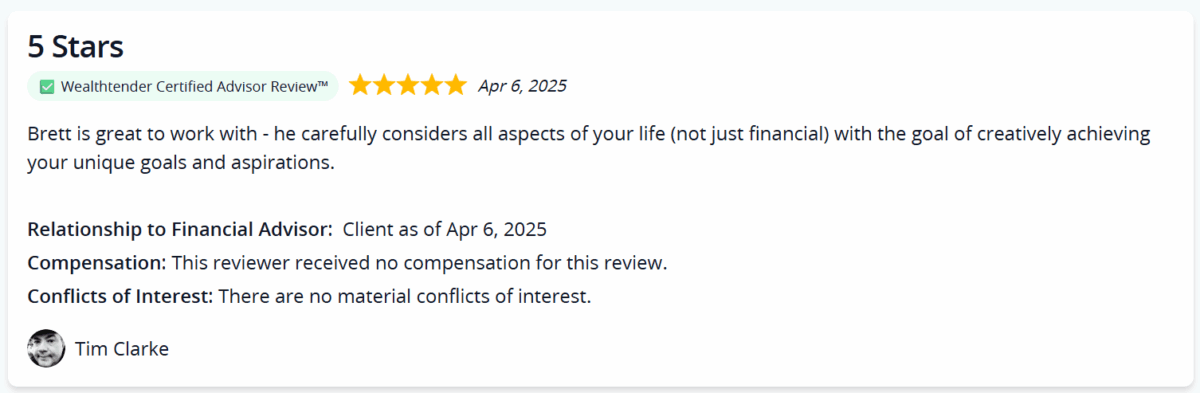
When all reviews for a financial advisor are displayed in one place, for example on an advisor’s Wealthtender profile page or a dedicated testimonials page on an advisor’s website, then these three clear and prominent disclosures may be the only ones required, as shown in the screenshot just above extracted from an advisor’s Wealthtender profile page. But if you wish to promote a single review, say in a social media post, or a handful of reviews in a carousel of three on your homepage, additional disclosures must be added to satisfy regulatory requirements as we’ll discuss next.
What Changes When You Feature Just One or a Few Reviews: The “Not Representative” Requirement
When you display just one or a select few testimonials in your marketing activities, for example on your homepage, additional disclosure requirements apply. Specifically, your disclosures must also indicate that the single or selected reviews are ‘not representative’ and you must provide easy access for consumers to view all, or a representative selection, of your reviews, most often by sharing a URL or QR code.
This increases transparency and reduces the optics that you’re only showing your best testimonials while hiding less favorable feedback. Linking to your Wealthtender profile page where all reviews are accessible, or to a dedicated testimonials page on your website that includes all of your reviews, can satisfy this critical compliance requirement.
Let’s consider two examples.
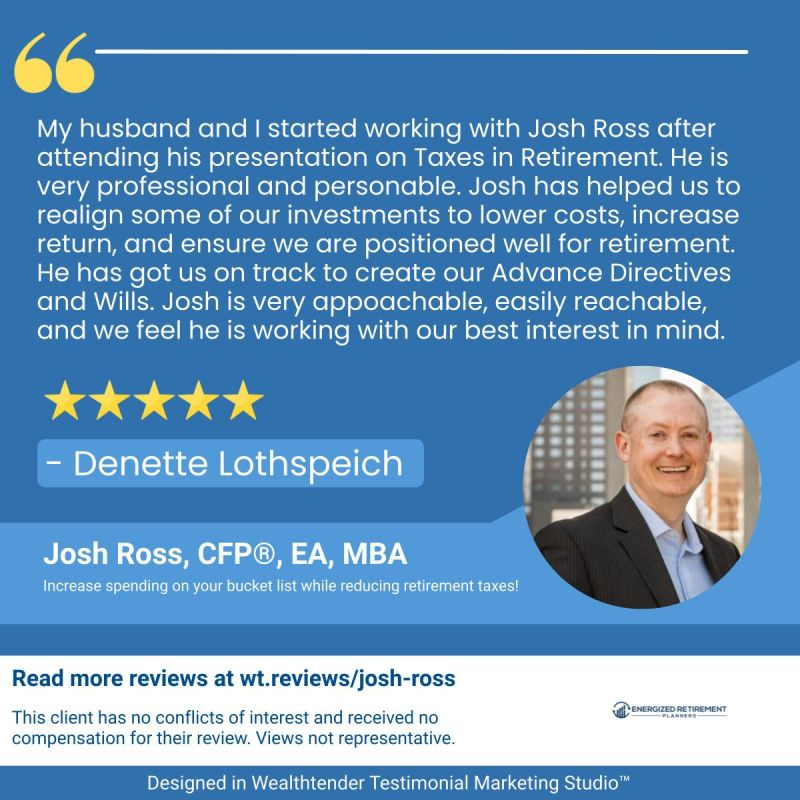
First, in the screenshot just below, a single testimonial is featured in a social media post that satisfies the SEC Marketing Rule disclosure requirements as follows:
- The three ‘clear and prominent’ disclosures are conveyed in the first sentence within the disclosure area.
- The second sentence addresses the ‘views not representative’ disclosure requirement.
- The ‘Read more reviews…’ statement satisfies the regulatory requirement to provide consumers with an easy ability to access and read all reviews for this advisor, available by visiting the URL: wt.reviews/josh-ross
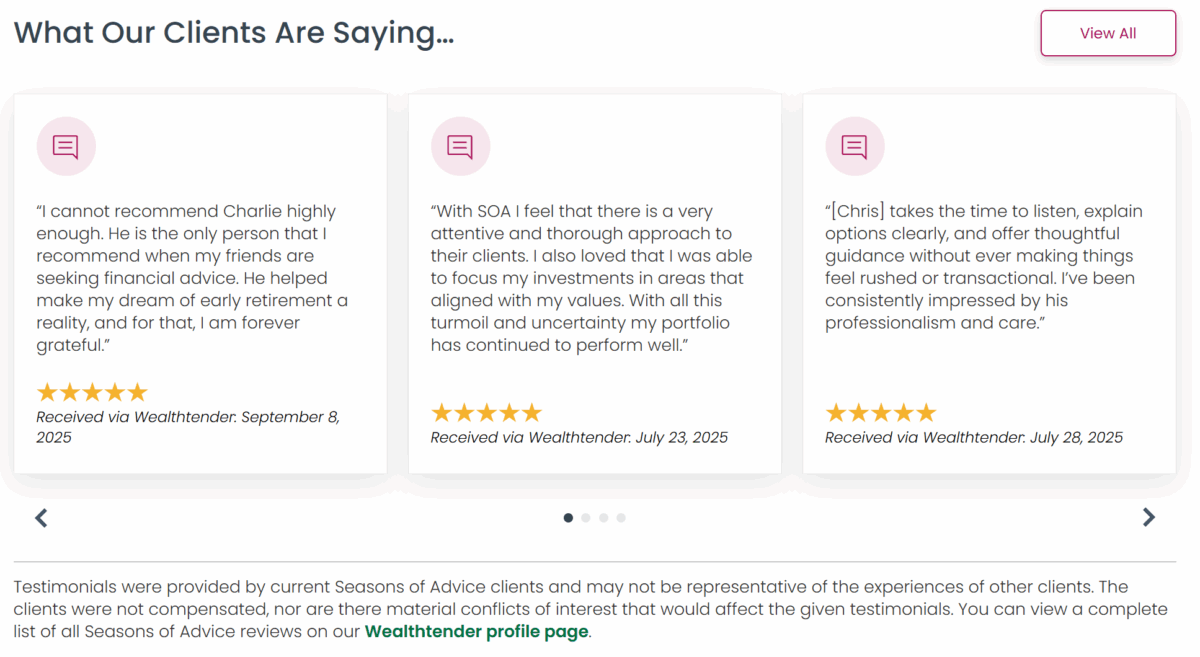
Second, in the screenshots just below, you’ll see a carousel feature on the homepage of advisory firm websites that display just a handful of testimonials. This approach satisfies the SEC Marketing Rule disclosure requirements as follows:
- The three ‘clear and prominent’ disclosures are conveyed in the first two sentences within the disclosure area. In these examples, the wealth management firm ensured that each testimonial displayed is from a current client, who was not compensated, and where no conflicts of interest exist.
- The first sentence also addresses the ‘views not representative’ disclosure requirement.
- The last sentence lets consumers know where they can go, with a link to read a complete list of all of the firm’s reviews “on our Wealthtender profile page”.
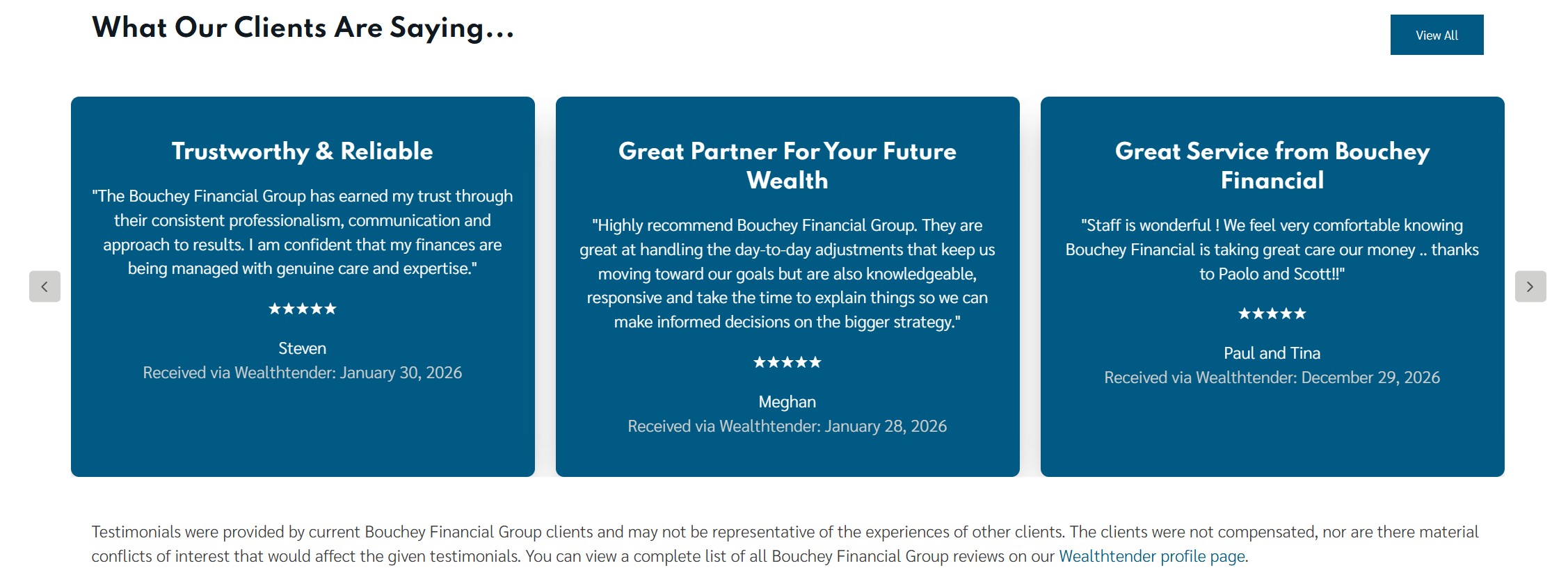
Real-World Examples: How Advisory Firms Display Compliant Homepage Carousels
Today, many wealth management firms have incorporated a carousel of a few testimonials on their homepage. Each of the firms below is worth a look before you brief your own website team:
Two Popular Ways to Promote Testimonials on Advisor Websites
Before we get to the two approaches, there is a distinction worth settling, because confusing these two things is the single most common reason a website request comes back built wrong. A carousel and a Wealthtender widget are not competing options. They are different mechanisms that do different jobs, and most firms end up using both.
Mechanism A · Built on your site
A carousel of selected reviews
Nothing from Wealthtender is needed to build this. Nearly every website platform already ships a testimonial or quote carousel component. You choose three to five reviews, your developer pastes the text into the slots, and the carousel rotates them.
Because it shows a curated selection of reviews, a block of disclosure text must sit directly below it.
The carousel content is static. When you want to swap reviews in or out, someone replaces the text inside the carousel component.
Best placement: your homepage.
Mechanism B · Pasted into your site
A Wealthtender embed widget
One snippet of code. It renders every review found on a particular Wealthtender profile, whether that is your firm profile or an individual advisor profile. The widget displays the newest review first and refreshes as new reviews are published on Wealthtender. It is standard third-party embed markup, offered via iframe or JavaScript code, with no API key and no build step. The disclosures added to a review through Wealthtender render inside the widget with each review automatically.
Because the widget shows every review rather than a subset, an additional disclosure block beneath it is typically not required by a firm’s compliance officer, though your compliance team should always be consulted for their guidance and signoff.
Available at the firm level, for multi-advisor Wealthtender subscriptions, and/or per advisor, displaying only that advisor’s reviews.
Best placement: a dedicated testimonials page, and/or individual advisor bio pages.
Put plainly: a carousel is something your developer builds. A Wealthtender widget is code your developer pastes in. The second one is not a link to your profile. Most firms run a carousel on the homepage to showcase a handful of reviews and use Wealthtender widgets on the testimonials page and/or advisor bios for comprehensive coverage. The “read all reviews” link the carousel disclosure requires then points at the testimonials page, or at your Wealthtender profile, to satisfy regulatory compliance.
Most website providers make it easy to implement testimonials in compliance-friendly ways using Wealthtender widgets and by giving advisors the flexibility to add required regulatory disclosures to testimonial carousels and lists. Based on our work at Wealthtender with financial advisors and wealth management firms using a variety of website providers, we’ve identified two popular approaches that combine those mechanisms and work especially well:
- The Comprehensive Approach (popular among multi-advisor wealth management firms)
- The Homepage Spotlight Approach (popular with solo advisors and smaller firms)
Let’s explore each approach in detail.
Approach #1: The Comprehensive Approach for Multi-Advisor Firms
Wealth management firms with multiple advisors often take a strategic, layered approach to displaying testimonials across their website. This method balances firm-wide social proof with individual advisor credibility, and it uses both mechanisms described above.
Step 1: Implement a Testimonial Carousel on Your Homepage
Ask your website provider, or search their help documentation, for the carousel feature you can use to display a rotating selection of three to five standout reviews on your homepage. For maximum effectiveness, prioritize reviews with content aligned to your Ideal Client Profile. If your ideal clients are Chevron executives nearing retirement, for example, a review that includes text like “…helped me make the most of my Chevron benefits as I transitioned into retirement…” will prove especially impactful. This immediately captures visitor attention, establishes trust, and makes it very likely you will be the first advisor a prospect chooses to contact.
Important compliance reminder
When using a carousel to display a curated selection of testimonials, you must also clearly display all required regulatory disclosures immediately below the carousel. The disclosure text has to be visible on the page itself. It cannot sit behind a tooltip, a modal, or a “disclosures” link, and it belongs with the carousel rather than down in the site footer. Refer back to the section above for the specific disclosure requirements.
Step 2: Create a Dedicated Testimonials Page
Create a standalone testimonials page on your website where prospects can view your complete collection of client reviews. You can then link to this page, and/or your Wealthtender profile, to satisfy regulatory requirements.
To ensure this page continuously reflects all of your client reviews, we recommend using a widget from Wealthtender, also known as an ‘embed code’, available from your Wealthtender dashboard.
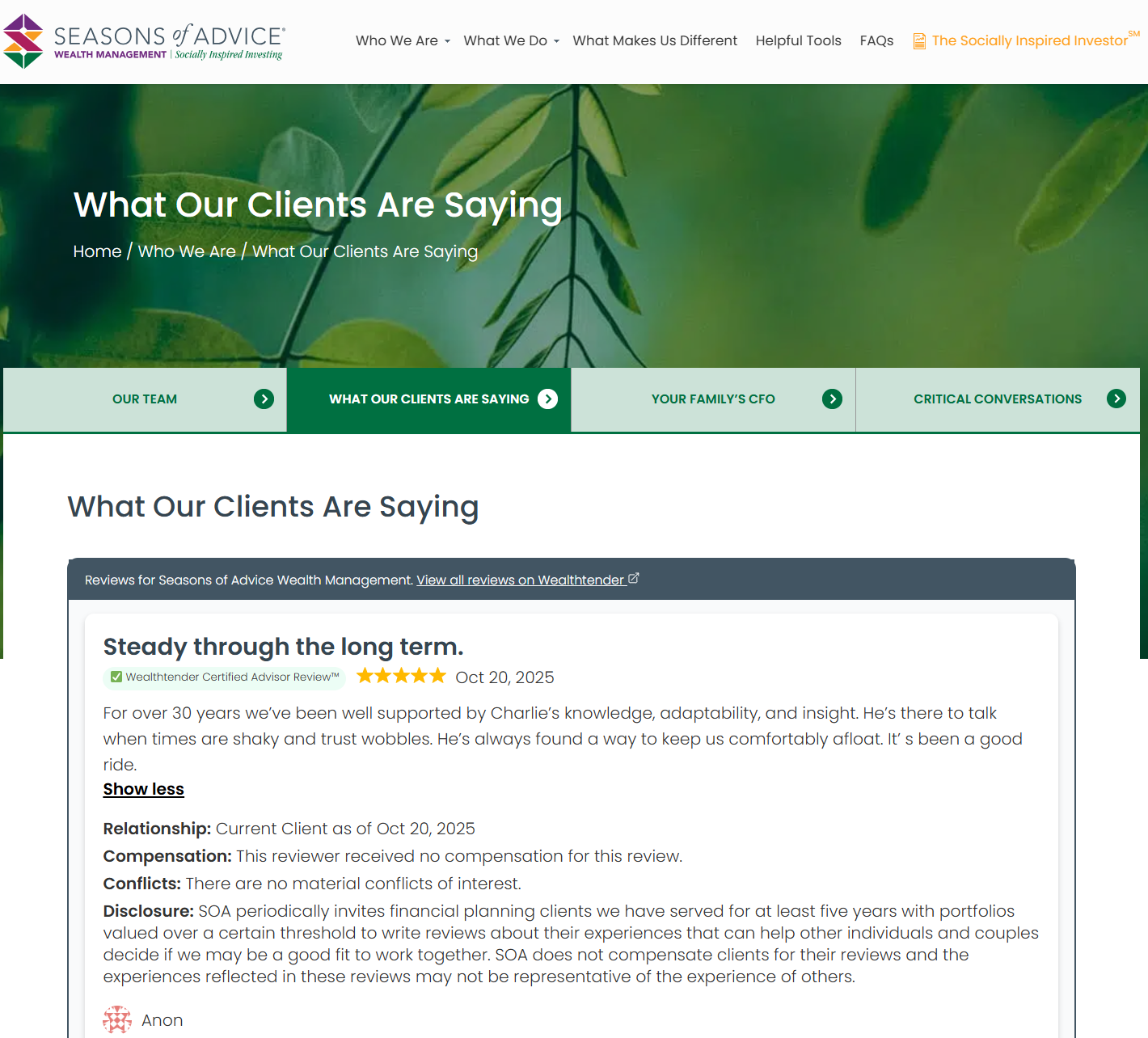
Recommended Wealthtender widget: the Wealthtender JavaScript widget is ideal for testimonials pages. This widget inherits formatting used elsewhere on your site and automatically displays all of your firm’s reviews in reverse chronological order, newest first, which satisfies SEC requirements about not filtering reviews to only show the highest ratings. The JavaScript widget includes built-in compliance disclosures for each review and is responsive across all devices. Your website provider’s help desk should be able to implement this widget quickly using the embed code from your Wealthtender dashboard. Alternatively, the Wealthtender iframe HTML widget can be used.
Here’s an example of a testimonials page on a wealth management firm’s website that uses the Wealthtender JavaScript widget:
Step 3: Display Reviews on Individual Advisor Bio Pages
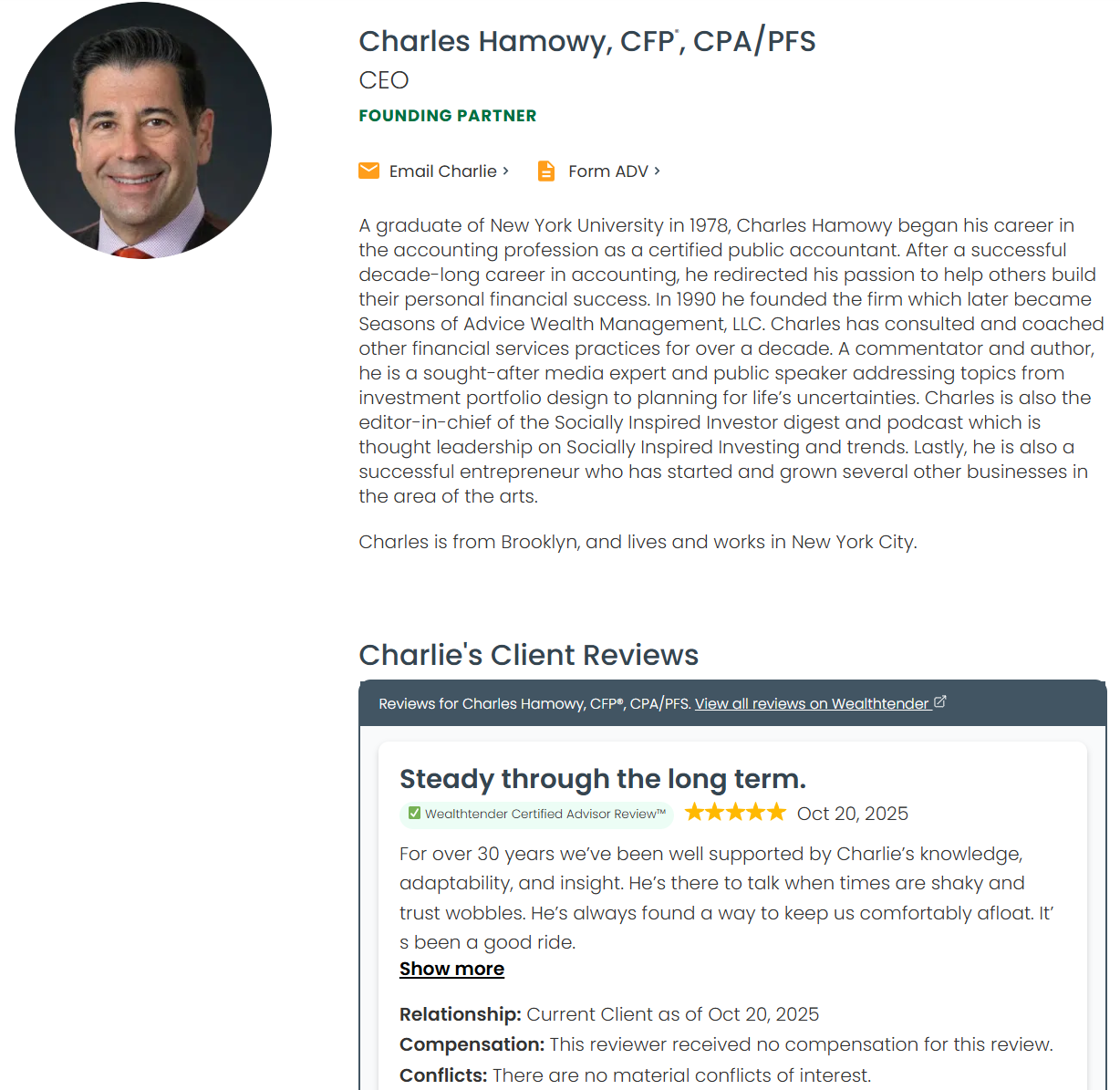
Take your testimonial strategy a step further by featuring advisor-specific reviews on each advisor’s bio page. Wealthtender offers widgets that display only the reviews written specifically for individual advisors, for firms that collect reviews at the individual advisor level. This approach helps prospective clients see testimonials most relevant to the specific advisor they’re considering working with, while the firm-wide testimonials page and Wealthtender profile provide access to all reviews for complete transparency.
Here’s an example of an advisor bio page on a wealth management firm’s website that uses the Wealthtender JavaScript widget:
Real-World Example: Seasons of Advice Wealth Partners
Seasons of Advice Wealth Partners provides an excellent example of the comprehensive approach in action, with all three layers live on one site:
What their website does
A homepage carousel showcasing client testimonials that immediately greet visitors
Clear, compliant disclosure language integrated naturally into their design
Links to view all reviews on their dedicated testimonials page and Wealthtender profiles
Individual advisor pages highlighting reviews specific to each team member
This multi-layered approach maximizes the impact of testimonials across the entire website while maintaining full regulatory compliance.
Approach #2: Homepage Spotlight for Solo Advisors and Smaller Firms
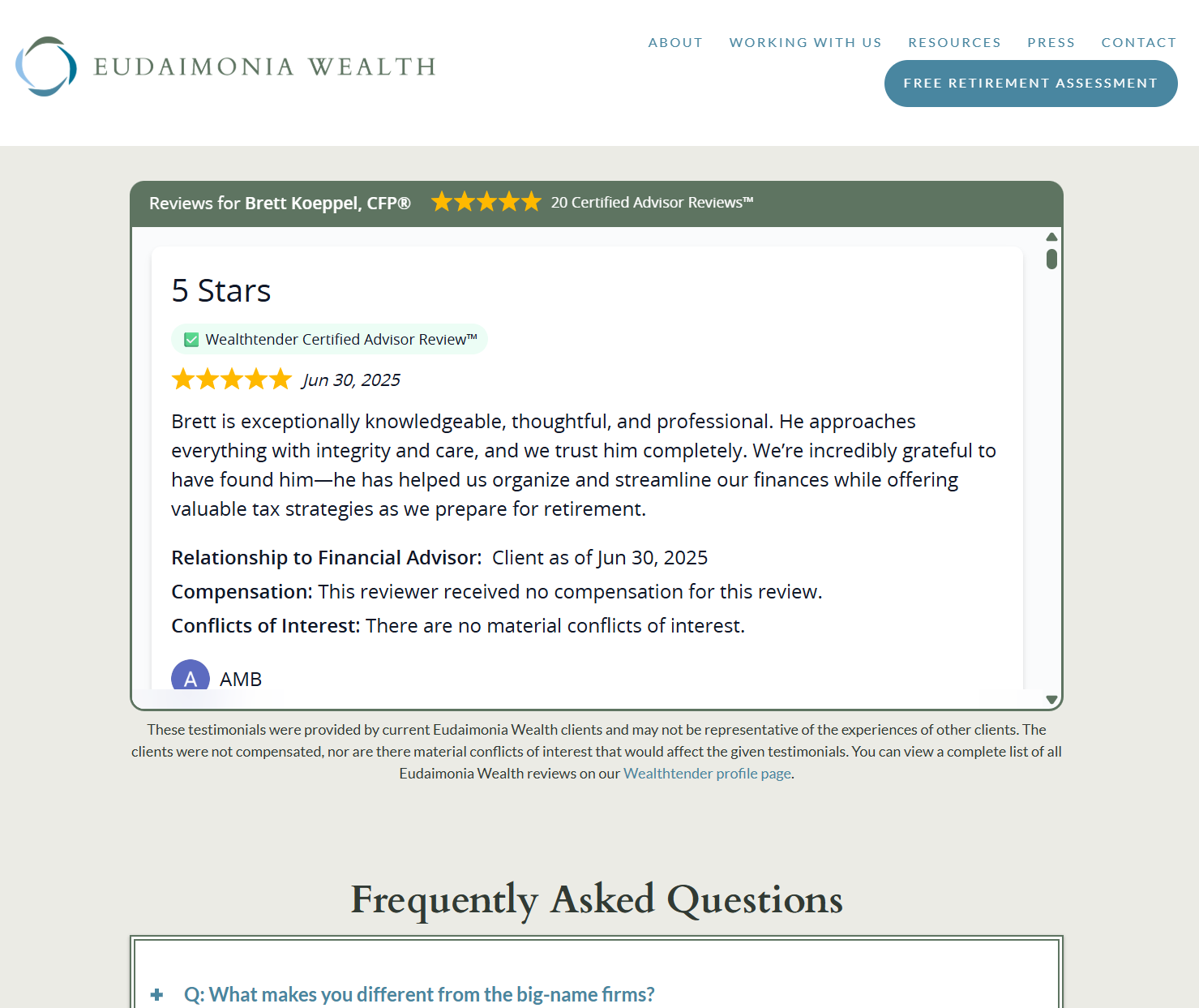
Solo advisors and smaller wealth management firms often prefer a more straightforward approach: prominently displaying all reviews on their website’s homepage using a Wealthtender widget, with no carousel involved at all.
How to Add a Wealthtender Widget to Your Homepage
Many advisors in the Wealthtender community embed a Wealthtender widget directly on their homepage, making testimonials one of the first things prospects see when visiting their website. This immediate social proof motivates website visitors to schedule introductory calls.
Widget options: advisors can choose either the Wealthtender JavaScript or iframe HTML embed code to display reviews on their website. Both are standard third-party embed markup and both include the required disclosures with each review.
Compliance note
Unlike a carousel featuring a selected few reviews, a Wealthtender widget that displays all of your reviews shows a complete and representative sample. Because visitors are already seeing every review, with the review-level disclosures attached to each one, an additional disclosure block beneath the widget is typically not required and no separate link to your full review history is needed. As always, your compliance team should have the final say on what appears on your website.
Here’s an example of a solo advisor who displays an iframe widget on his homepage:
Ready to Add a Dedicated Testimonials Page? Here’s How That Works
Alternatively, some advisors choose to create a dedicated testimonials page as the primary location for their reviews, then link to that page prominently from their homepage and throughout their site. Either approach works well from a compliance standpoint, as long as the widget displays your complete collection of reviews rather than a filtered selection.
Five Advisors and Firms Using the Homepage Spotlight Approach
Today, many advisors and wealth management firms have incorporated the homepage spotlight or testimonials page approach with a Wealthtender widget embedded on their websites, including these examples:
Each of these firms demonstrates that when reviews are displayed compliantly, they become one of the most powerful trust-building elements on an advisor’s website.
How to Access Your Wealthtender Embed Codes
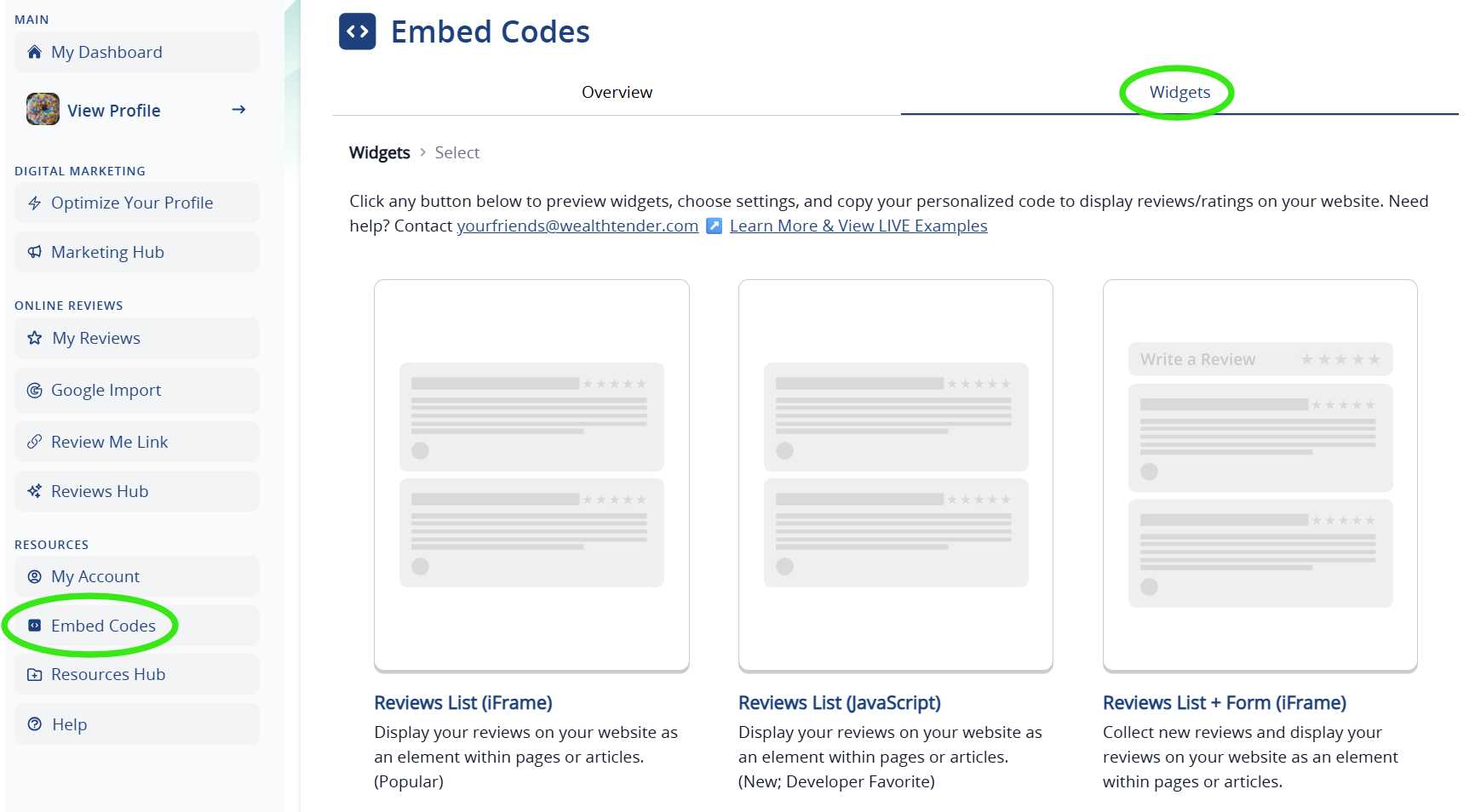
To access your embed codes from Wealthtender, it’s easy to do:
- Sign in to your Wealthtender account and visit your dashboard, or the Enterprise Dashboard for multi-advisor subscriptions
- In the left sidebar menu, look for Embed Codes
- Preview and then choose the embed code(s) you’d like to use and look for the Copy Code button
Take an Interactive Tour: Finding Your Embed Codes
Prefer to see it before you sign in? Click through the interactive tour below to walk the exact path from your dashboard to a copied embed code. It takes about 60 seconds, and nothing you click here affects your live profile.
Interactive tour: locating and copying your review widget embed codes inside the Wealthtender dashboard.
Once you’ve copied your preferred embed code, you can:
- Share it with your website provider contact, who can implement it for you. All website providers and developers should be familiar with these industry-standard embed code formats and able to add them quickly.
- Add it directly to your website if you manage your own site content.
- Email it to your marketing team if they handle website updates. The section below writes that email for you.
The widget implementation typically takes just a few minutes, and once live, your testimonials will automatically update whenever you receive new reviews, with no additional website updates required. Please note that depending on your website cache refresh settings, your widget may take a few minutes or several hours to reflect new reviews. Speak with your website representative to discuss your cache settings.
Email Template: What to Send Your Website Developer About Adding Client Testimonials
The question we field most often is not about the SEC Marketing Rule. It is simpler and more practical than that: what do I actually say to my web person?
It matters more than it sounds, for the reason covered earlier. A carousel is something your developer builds using your website platform’s own tools. A Wealthtender widget is a snippet of code they paste in. A request that blurs the two tends to come back as the wrong implementation, or as a question you have to research before you can answer.
So we wrote the email for you. Add your details below and the tool assembles a complete, ready-to-send message that explains both mechanisms, includes the disclosure language your carousel will need with your firm name and review link already inserted, and points your developer to live advisor websites they can inspect. Copy it, read it over, send it.
Copy, personalize, send
Generate the email to send your website developer
Fill in a few details and this builds a ready-to-send email explaining exactly what you want added to your site, including the disclosure language your carousel needs and links to live examples your developer can inspect. Nothing is stored or sent anywhere.
1Your details
Leave anything blank and it stays as a clearly marked placeholder you can fill in later.
2Your email, ready to send
3The disclosure text on its own
This is the block that sits directly below a carousel showing a selected few reviews. It is already included in the email above, but your developer will probably want it by itself. Have your compliance team review and approve the final wording before it goes live.
One caution worth repeating. The disclosure language this tool produces reflects how wealth management firms are handling curated carousels today, and it addresses each element the SEC Marketing Rule calls for. It is a starting point for your compliance team, who should always have final say on the disclosure language displayed on your website.
Would you rather we work with your website developer directly? Email yourfriends@wealthtender.com with their name and email address and we will give them their own access to the Wealthtender developer portal, where every embed code for your profiles lives. Most firms find this is the fastest path when an outside agency manages the site.
Your Next Three Steps: From Embed Code to Live Testimonials
The way consumers find and compare financial advisors is shifting rapidly as AI tools like ChatGPT become a popular discovery and research platform. Consumers expect to find online reviews for financial advisors just as they do for doctors, attorneys, and other service providers. Advisors who proactively collect and promote client testimonials compliantly are positioning themselves to capture a disproportionate share of new client opportunities.
With Wealthtender as your digital marketing partner, you already have a strong foundation to generate growth through a powerful online presence. Now it’s time to amplify your advantage by implementing client testimonials strategically across your website. Whether you choose the comprehensive approach with testimonials featured in a homepage carousel and advisor bio pages, or the homepage spotlight approach featuring your complete review collection in one place, both strategies shine on advisor websites and help you stay fully compliant with SEC regulations.
Your future clients are online right now, searching for a financial advisor they can trust. Make sure they find you and that they see the proof of the exceptional service you provide through the voices of your satisfied clients.
FAQs: Review Widgets, Troubleshooting & More
What should I tell my website developer to get my reviews displayed?
Be explicit that you are asking for two different things, because they are easy to confuse and only one of them involves Wealthtender code.
- A testimonial carousel on the homepage, built with your website platform’s own component. You supply three to five reviews. Your developer supplies the carousel. Directly beneath it, they add disclosure text stating that the reviewers are current clients, that no compensation was paid, that no known conflicts of interest exist, that the testimonials displayed are not representative of the experience of all clients, and where visitors can view a more complete representative list of your reviews.
- A Wealthtender embed widget on a dedicated testimonials page and, optionally, on each advisor bio page. This is a single snippet of standard embed markup, offered via iframe or JavaScript code. It displays all of your reviews newest first, renders the required disclosures with each one, and updates itself as new reviews arrive. Because it shows every review rather than a subset, an additional disclosure block beneath it is typically not required, though your compliance team should always have the final say.
Send your developer live examples too. Bouchey Financial Group is a clean model for the carousel plus disclosure pattern, Seasons of Advice runs both approaches together, and Rather & Kittrell shows a Wealthtender firm widget on the homepage alongside an advisor-level widget on a bio page.
The email template earlier in this guide assembles all of this for you, with your firm name and review link already filled in.
Where can I view live examples of Wealthtender widgets on advisor websites?
To view examples of the Reviews List (JavaScript) widget, visit the following pages for Seasons of Advice Wealth Partners:
To view examples of the Reviews List (iFrame) widget, visit the following pages for these advisors and advisory firms:
- Rather & Kittrell (homepage) | Lytle Rather (advisor bio)
- Quotient Wealth Partners
- Beacon Wealth
- Level Wealth Management
- Thayer Financial
- Focus Planning Group
- Water Street Wealth Management
- Insight Financial Strategists
To view examples of the Gallery View widget, visit the following advisory firm websites:

To view examples of the Reviews List + Form (iFrame) widget, visit the testimonials pages for these firms:
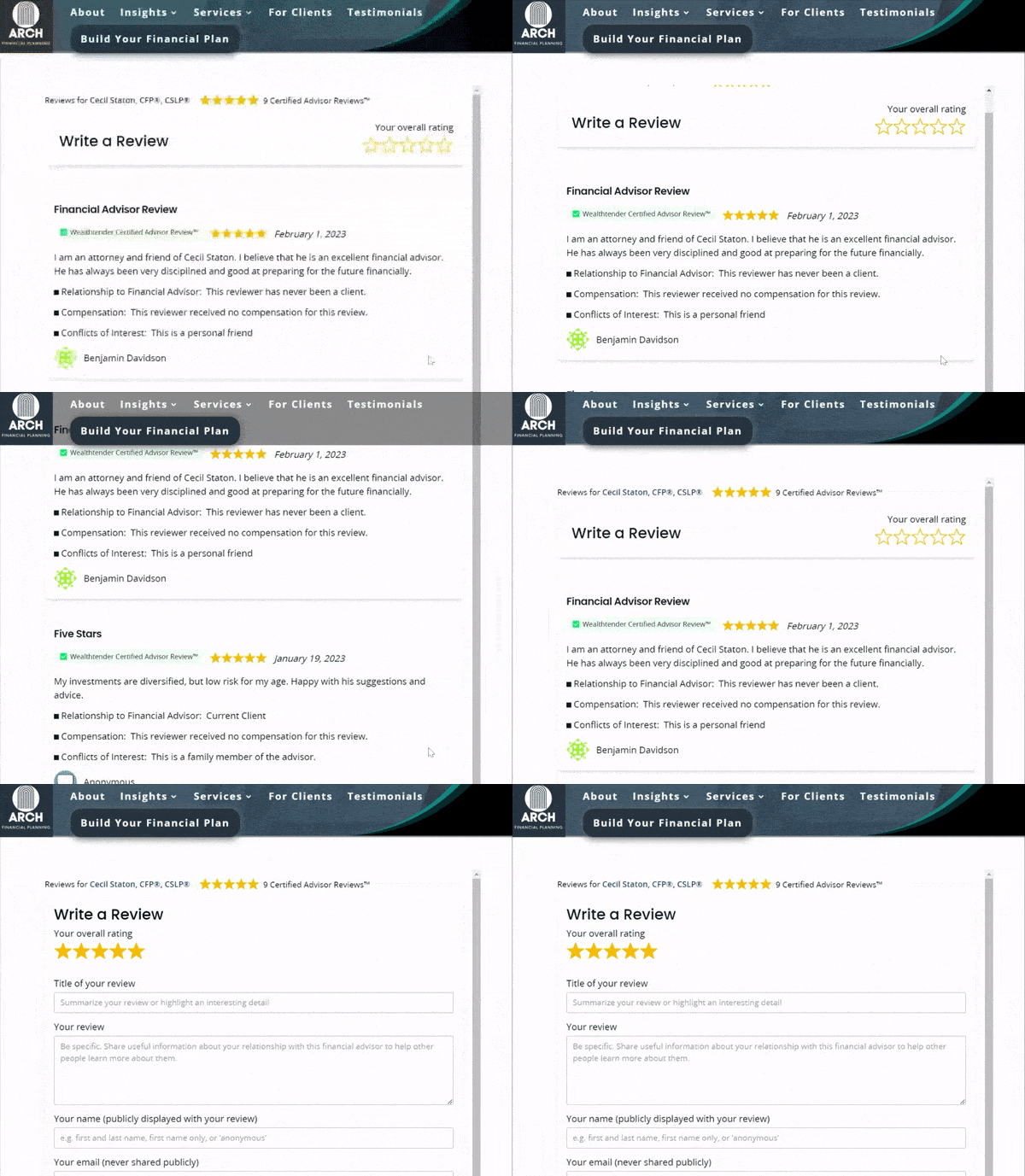
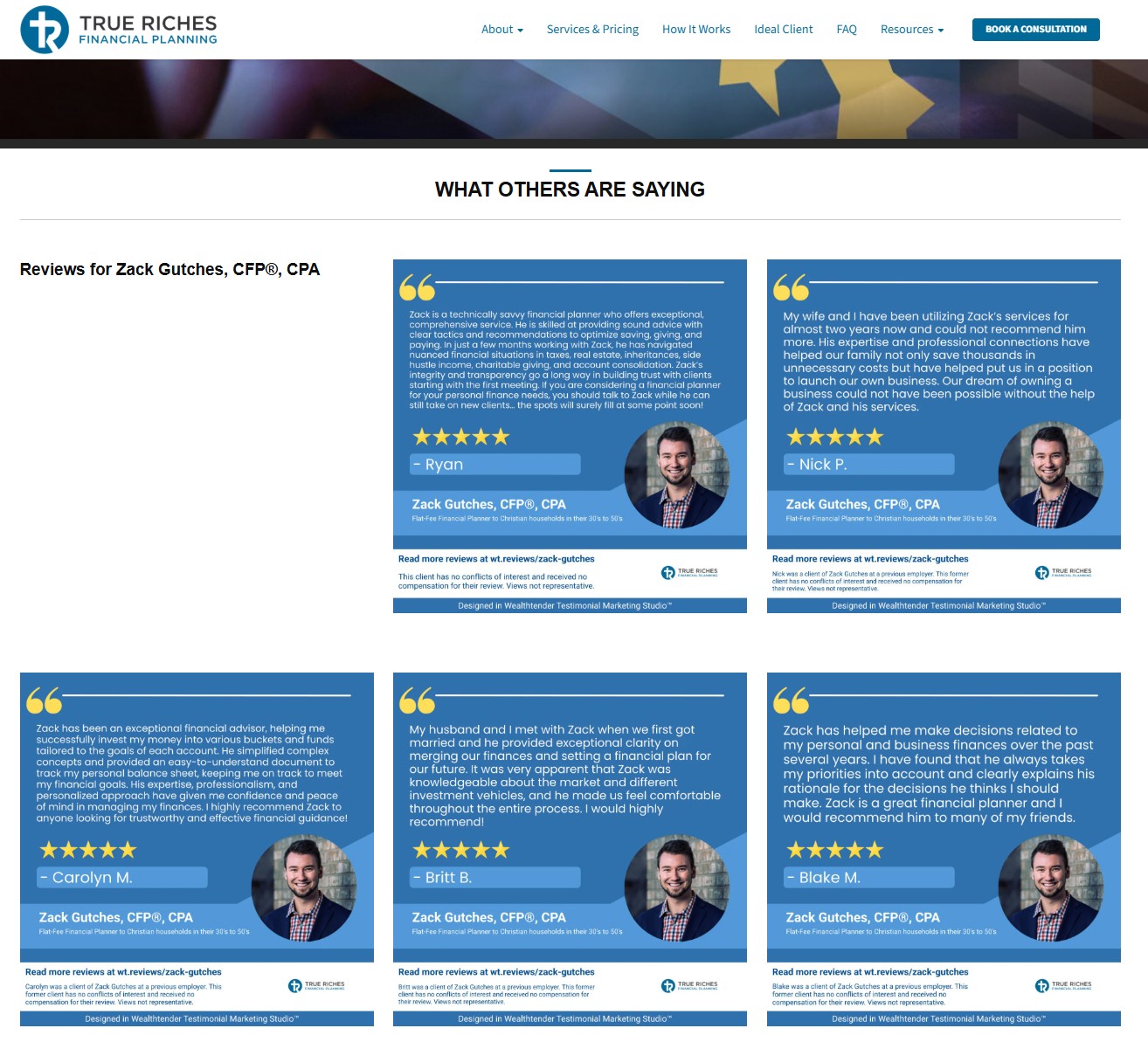
Instead of using an embed widget to display testimonials, other advisors have chosen to create a testimonials page using designs they created within Wealthtender Testimonial Marketing Studio.
Example: True Riches Financial Planning: reviews for Zack Gutches
Have an FMG website? Learn how FMG and Wealthtender offer ways to display testimonials on your website.
If you’re a financial advisor or wealth management firm using FMG as your website platform and Wealthtender as your digital marketing partner, you have a powerful opportunity to showcase client testimonials in ways that build trust with prospects while maintaining regulatory compliance.
Visit this guide to learn how FMG users are successfully promoting testimonials on their websites using FMG’s carousel feature and widgets from Wealthtender.
Beyond websites, how can financial advisors promote client testimonials on social media?
You’ll have opportunities to promote your reviews on popular social media sites like Facebook, Instagram, LinkedIn, and X (Twitter), but doing so compliantly within the character count limitations and other constraints means it’s important to proceed with caution. Fortunately, each of these platforms permits creating posts with image and video files which can be designed to incorporate the required disclosures.
To compliantly promote a client testimonial on social media, you’ll need to ensure you incorporate the required clear and prominent disclosures alongside the review, along with a link to a representative sample of your testimonials, for example all of your reviews on your own website or Wealthtender profile page.
For financial advisors in the Wealthtender community, we created Testimonial Marketing Studio to help advisors promote their online reviews compliantly in social media posts and beyond.
With Testimonial Marketing Studio, you can:
✔️ Access a growing library of professionally designed video and image templates
✔️ Import your online reviews from Wealthtender into Studio projects with just two clicks
✔️ Create scroll-stopping social media content and impactful resources for marketing campaigns in under two minutes
✔️ Preview and regenerate projects to optimize their design and ensure disclosures satisfy compliance requirements
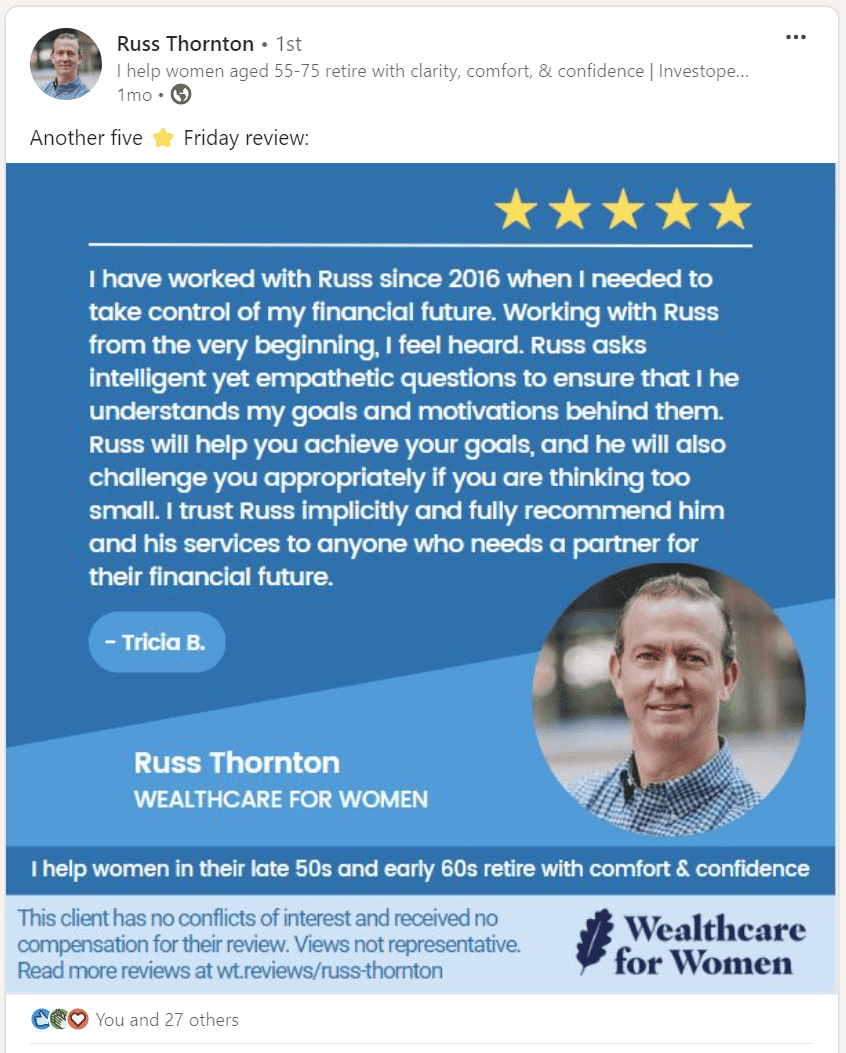
Below is an example of a LinkedIn post created in Wealthtender Testimonial Marketing Studio with required regulatory disclosures, including a link to a representative sample of reviews. Click here to view additional examples, including images and animated designs.
Where can website developers access embed codes for Wealthtender review widgets?
Please visit the Wealthtender dev portal to preview and access embed codes for financial advisors and wealth management firms with profiles on Wealthtender. Questions? Please contact yourfriends@wealthtender.com. We’re always happy to help.
How can I troubleshoot issues with a Squarespace website?
In October 2025, an isolated issue with the Wealthtender JavaScript embed code resulted in the display not rendering properly in the Google Chrome browser. To resolve it, the code below was tested and provided to an advisor as a solution. The issue lies in the way Chrome chooses to render the page on mobile.
Note: the code below will only work by replacing the id “XXXXX” with the correct provider ID for the applicable Wealthtender profile. Questions? Please contact yourfriends@wealthtender.com. We’re always happy to help.
<iframe id="wt_embed" src="https://wealthtender.com/embed/?type=reviews-block&id=XXXXX&height=400" style="width: 100%; border: 0px;"></iframe>
<script>var wtFrame = document.getElementById("wt_embed"); window.addEventListener("message",(event)=>{var width=event.data[0];var height=event.data[1];wtFrame.height=parseInt(height);console.log(event)},false);
function refresh(){ document.getElementById("wt_embed").src = document.getElementById("wt_embed").src; } setTimeout(function() { refresh(); }, 2000);
</script>
Building a Testimonial Marketing Strategy That Compounds Over Time
We hope you found this article helpful, and we encourage you to read each of the articles in our SEC Marketing Rule Education Series for more ideas to compliantly attract new clients and grow your business with online reviews and testimonials. Financial advisors who embrace online reviews in their marketing efforts will lead the industry in attracting new clients during the historic transfer of wealth from Baby Boomers to Millennials over the next decade.
Online reviews establish a human connection with prospects, demonstrating your trustworthiness and increasing their confidence in contacting and hiring you. But online reviews are just one important part of an effective marketing plan to strengthen your online reputation and attract new clients in today’s world.
At Wealthtender, we’re dedicated to helping you grow your business compliantly with Certified Advisor Reviews™ and our Modern Advisor Marketing platform, providing you with the tools to ensure prospects can find you online and feel confident about their hiring decision.
Questions or feedback?
If you have questions, feedback, or would like to discuss the SEC Marketing Rule with us, email yourfriends@wealthtender.com or call Wealthtender Founder and CEO Brian Thorp directly at (512) 856-5406.

About the Author
Brian Thorp
Brian is CEO and founder of Wealthtender and Editor-in-Chief. He and his wife live in Austin, Texas. With over 25 years in the financial services industry, Brian is applying his experience and passion at Wealthtender to help more people enjoy life with less money stress. Learn More about Brian